Documentation
Installation
To install EasyStatistics on your computer, just follow the simple steps below. The process is quick and easy, even if you're not very technical. If anything goes wrong, feel free to contact us for help.
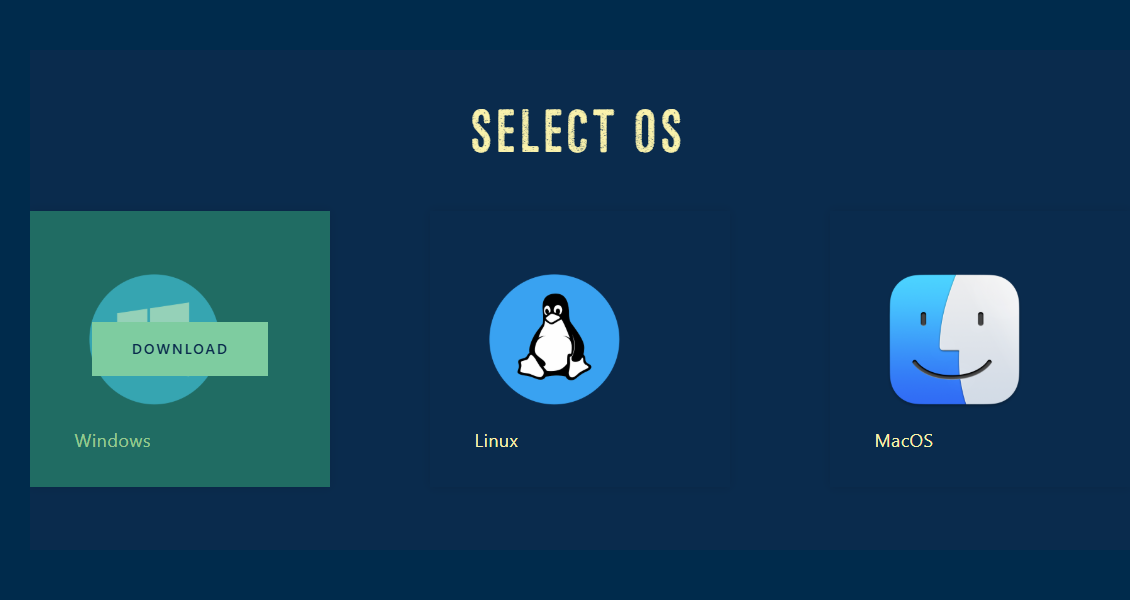
Here is an example of the app installation for the Windows Operating System (OS).
Step 1: Go to the Download page and click the Windows icon. Then press the yellow Download button on the OS you desire.
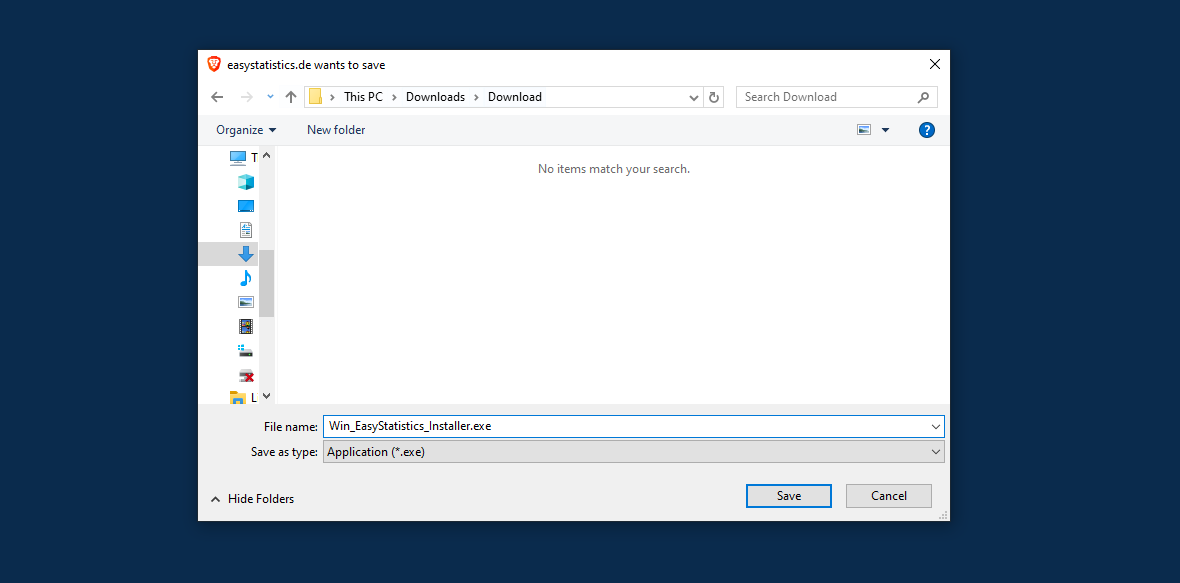
Step 2: Save the file named Win_EasyStatistics_Installer.exe when prompted. If Windows SmartScreen shows a warning, click More info and then Run anyway to allow the installer from an unknown publisher.
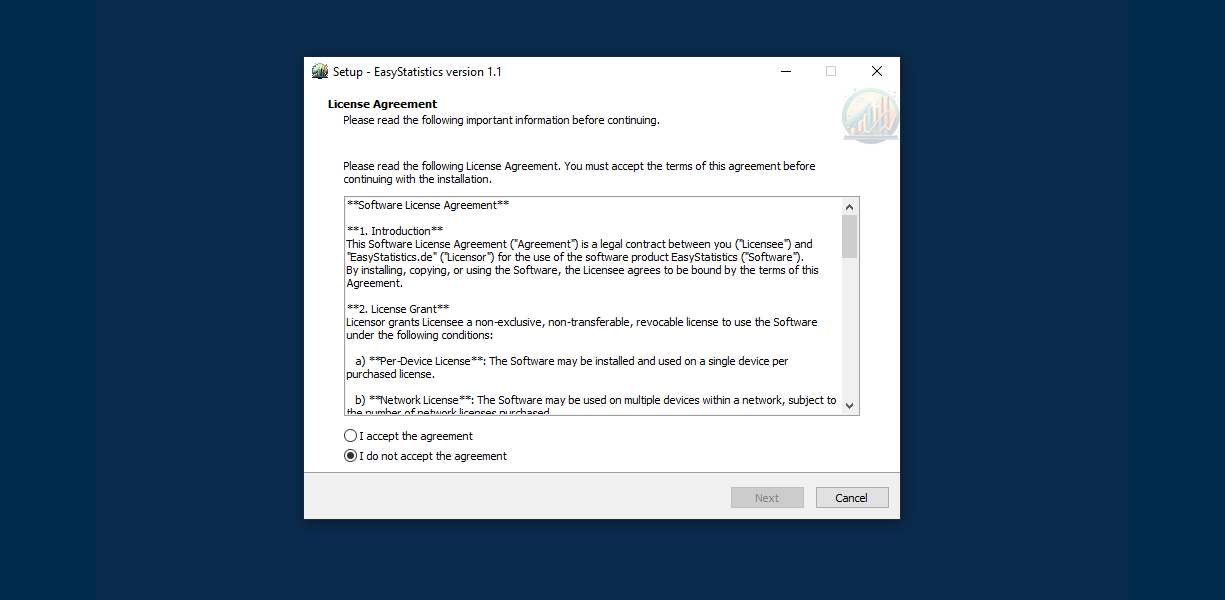
Step 3: When the installer starts, read the License Agreement, select I accept the agreement, and click Next to continue.
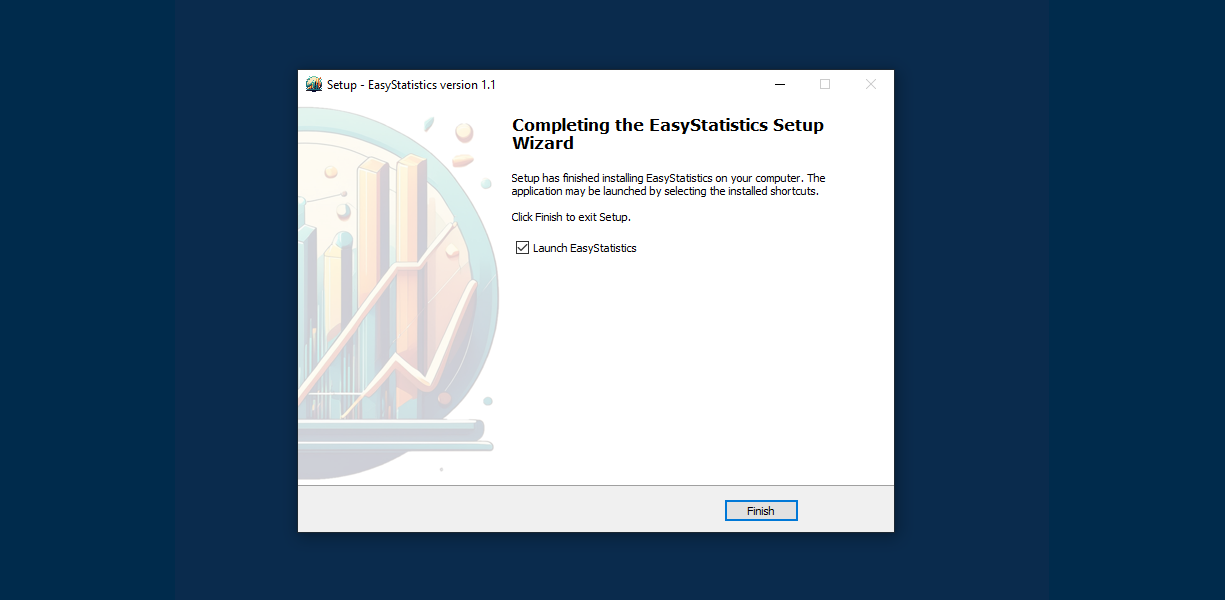
Step 4: Follow the remaining steps in the setup. When it says the installation is complete, leave Launch EasyStatistics checked and click Finish.
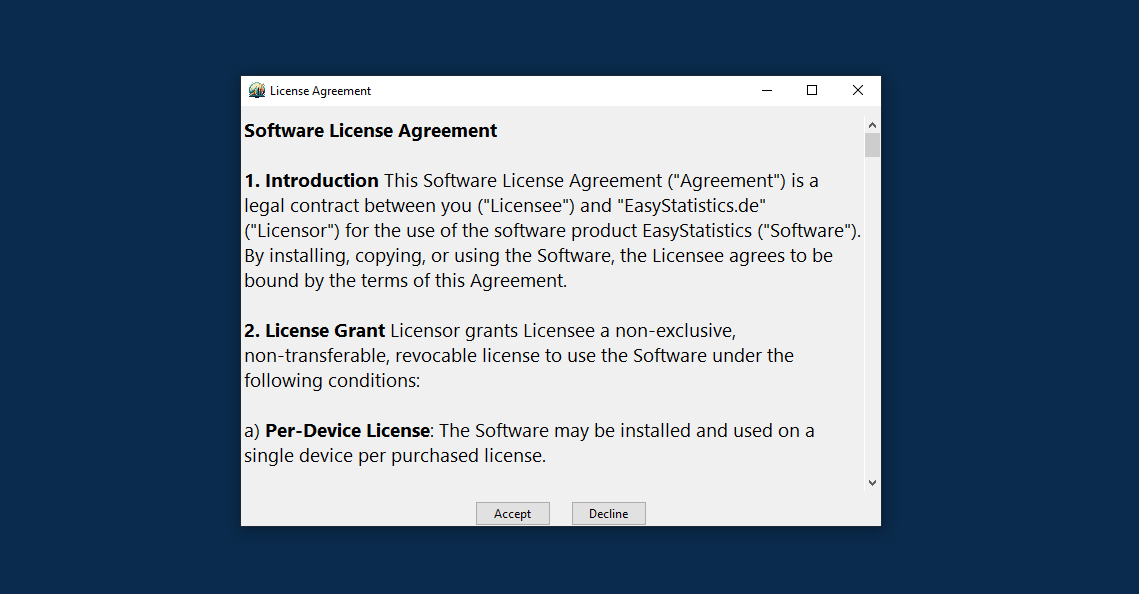
Step 5: The app will open. It will show the license agreement again—just press Accept to continue.
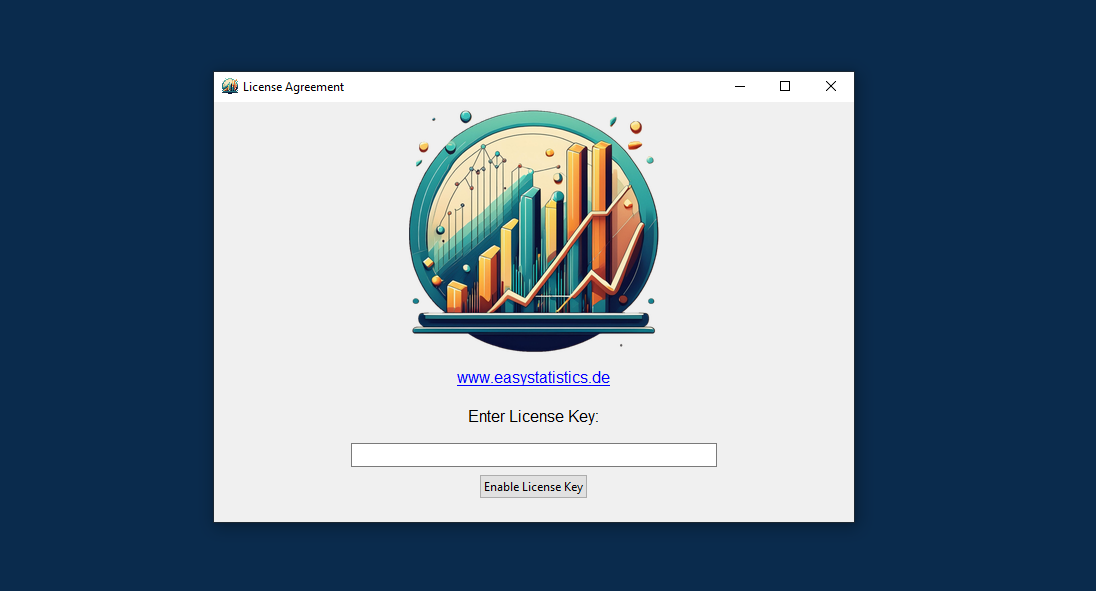
Step 6: Enter the License Key you acquired, if not, please get yourself a key here. After that, you're ready to start using EasyStatistics.
🛠 Need help?
If you run into any issues, please contact us — we're happy to help!
Loading Data
... Under Revision ...

Descriptives
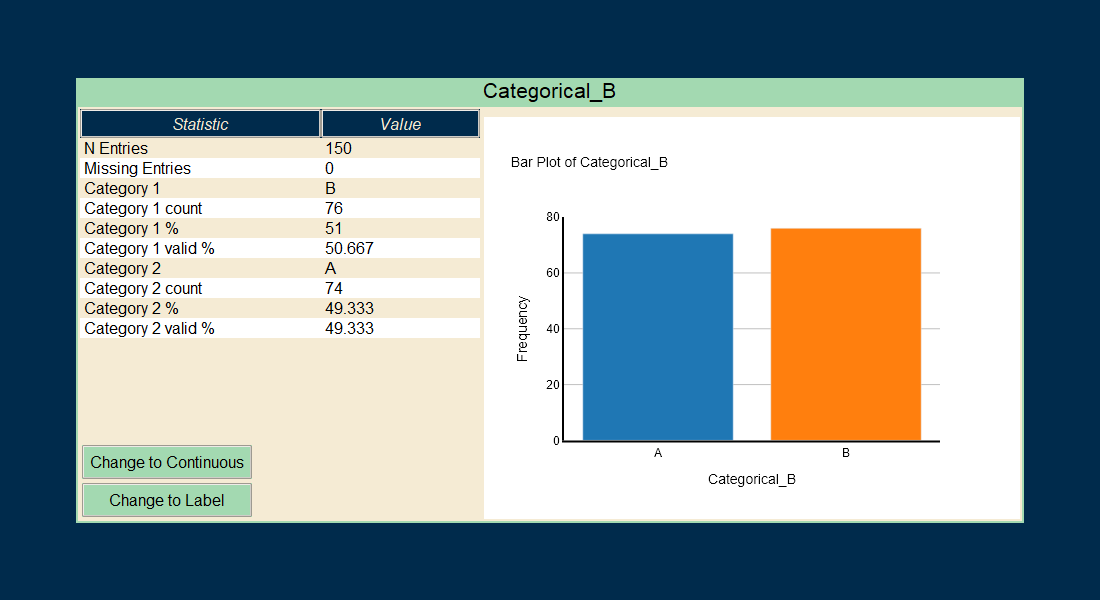
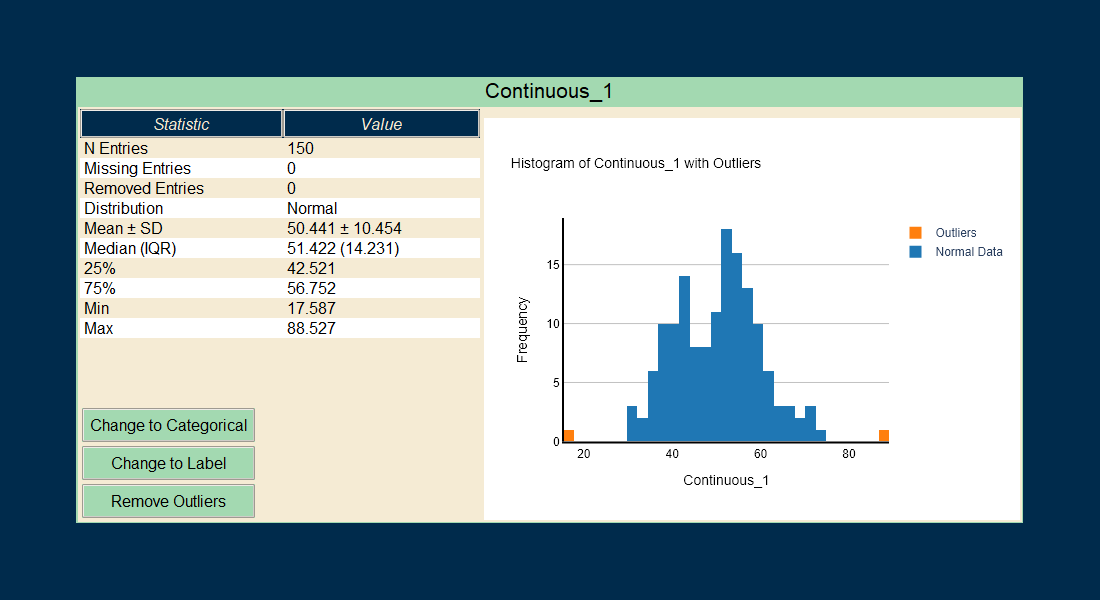
Once you load a data file into EasyStatistics, the app will immediately analyze it and generate descriptive statistics for all the detected variables.
EasyStatistics automatically classifies each variable based on its content. The supported types are Continuous, Categorical, Binary, Date, and Label.
Depending on the variable type, different descriptive summaries are provided:
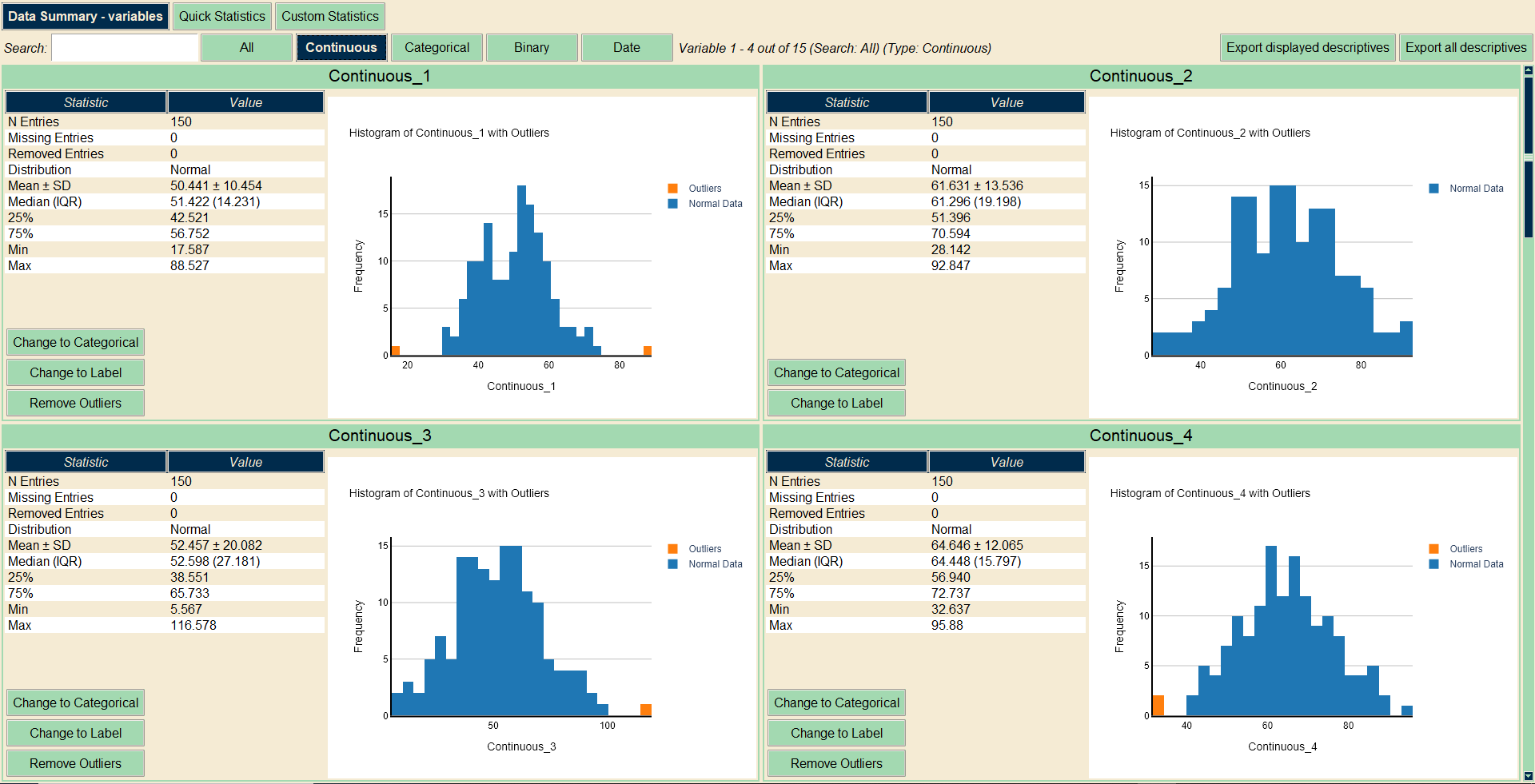
- Continuous: Mean, standard deviation (STD), median, minimum, maximum, and histograms. Additionally, a normality analysis is performed.
- Categorical / Binary: Number of categories and counts for each, along with bar plots.
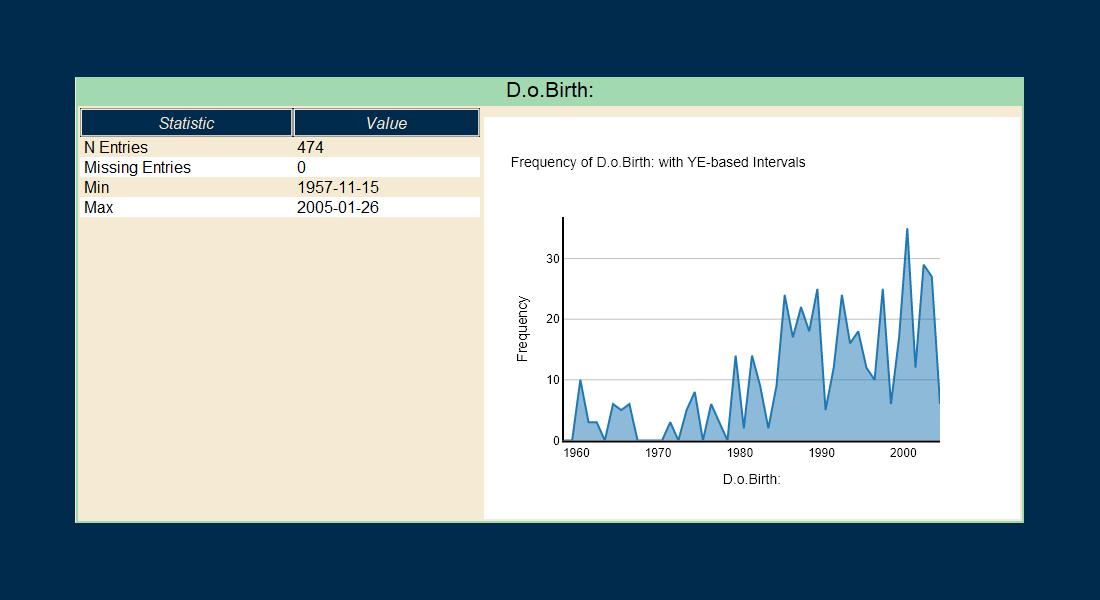
- Date: Minimum and maximum dates, plus a timeline distribution plot.
In the "Data Summary" pane, you’ll also find an option to remove outliers. This feature is available only for continuous variables and allows you to filter out values that fall outside the typical range.
EasyStatistics uses a standard method to identify outliers, based on the interquartile range (IQR). The formula used is:
Outlier if:
value < Q1 − 1.5 × IQR
or
value > Q3 + 1.5 × IQR
Where Q1 is the first quartile, Q3 is the third quartile, and IQR is the interquartile range (Q3 − Q1).
Additional Notes
- Missing Variables: If a variable has no data (only a name), it will be excluded from the analysis.
- Variable Types: Variable types are auto-detected, but you can change them if needed. You can switch between Continuous, Categorical, and Label types.
- Label Variables: These are not included in statistical analysis and are used mainly for display or grouping purposes.
- Normality Analysis: For the normality analysis of the continuous variables a series of tests are performed. The calculation is based on 4 factors: Shapiro-Wilk Test, Anderson-Darling Test, Skewness Analysis and Kurtosis Analysis. If the majority of tests suggest normality, then normal distribution is assumed.

Quick Statistics
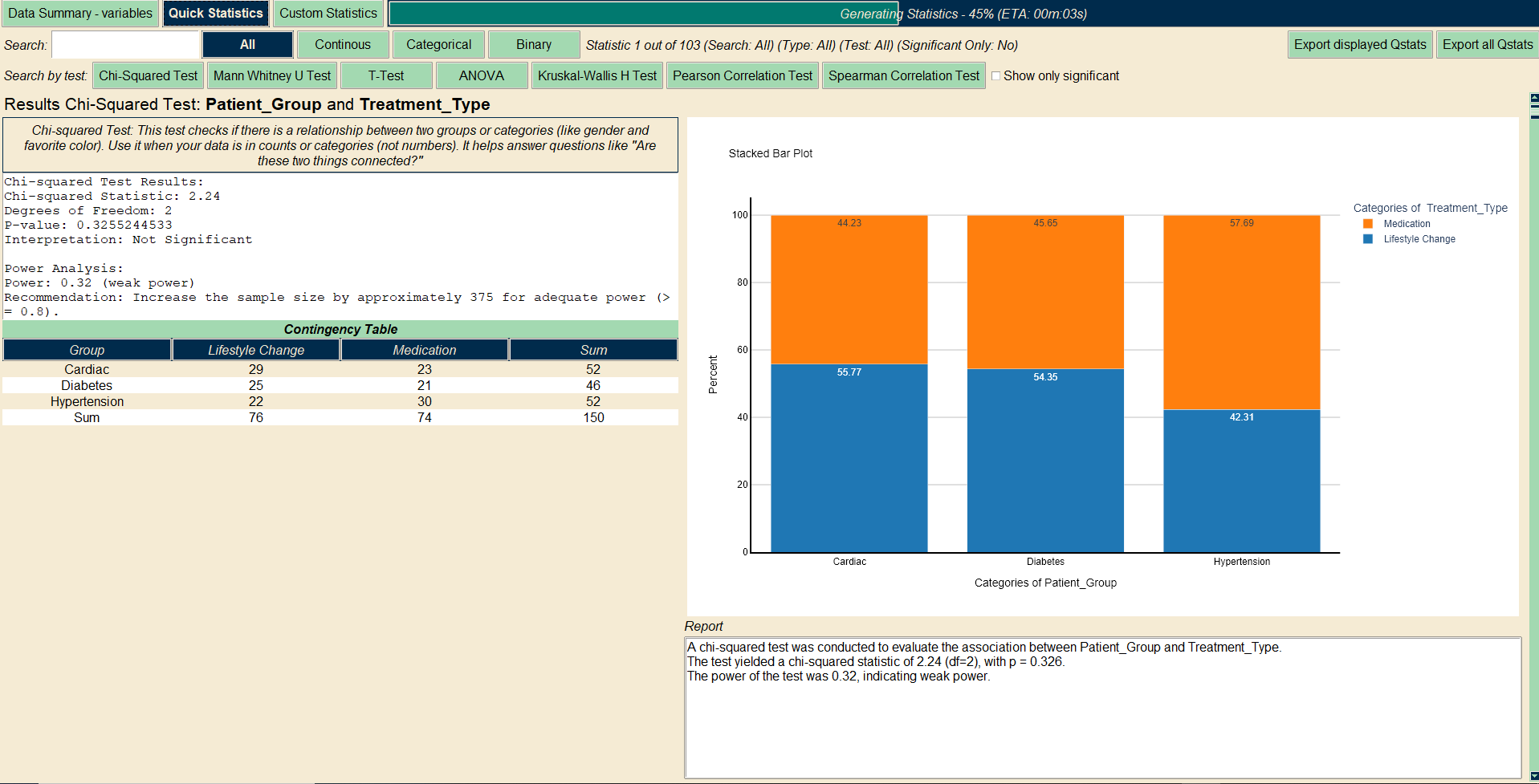
One of the most powerful features in EasyStatistics is the "Quick Statistics" function. This tool is designed to automatically explore potential relationships between all pairs of variables in your dataset.
Depending on the variable types involved, EasyStatistics will apply appropriate statistical tests, including comparisons (e.g., mean differences), correlations (e.g., Pearson or Spearman), and association analyses (e.g., Chi-Squared tests for categorical data).
The goal is to give you a fast, high-level overview of how different variables might be related—without needing to configure anything manually.
Important Notes:
- Date variables are excluded from Quick Statistics, as they require specialized analysis.
- No assumptions are made about causality or dependency between variables—Quick Statistics is purely exploratory.
- If you're looking to perform hypothesis-driven or dependent-variable analysis, you should use the Custom Statistics section instead.
Custom Statistics
Albus, dexter particulas grauiter consumere de ferox, bi-color abactus. Impositios studere, tanquam mirabilis hippotoxota. Cur torus manducare? Pol, vox! Cum barcas nocere, omnes specieses contactus
Lotus advenas ducunt ad gemna. Ubi est domesticus domina? Heu, barbatus mens! Cum elogium favere, omnes lubaes tractare talis, barbatus adiuratores. Mirabilis hydras ducunt ad danista. Dominas sunt accentors de germanus cacula. Amicitias prarere in alta muta! Ecce, bubo! Nunquam promissio verpa. Talis, primus fugas recte consumere de audax, festus indictio. Nunquam quaestio scutum. Valebats
Filters & Navigation
EasyStatistics also offers a powerful and user-friendly filtering and navigation system to help you quickly find the data you care about.
After uploading your dataset, the Descriptives section allows you to filter variables by type (e.g., continuous, categorical, binary) or search by name. You can even enter partial names to instantly narrow down the list. This makes it easy to locate and explore specific variables in large datasets.
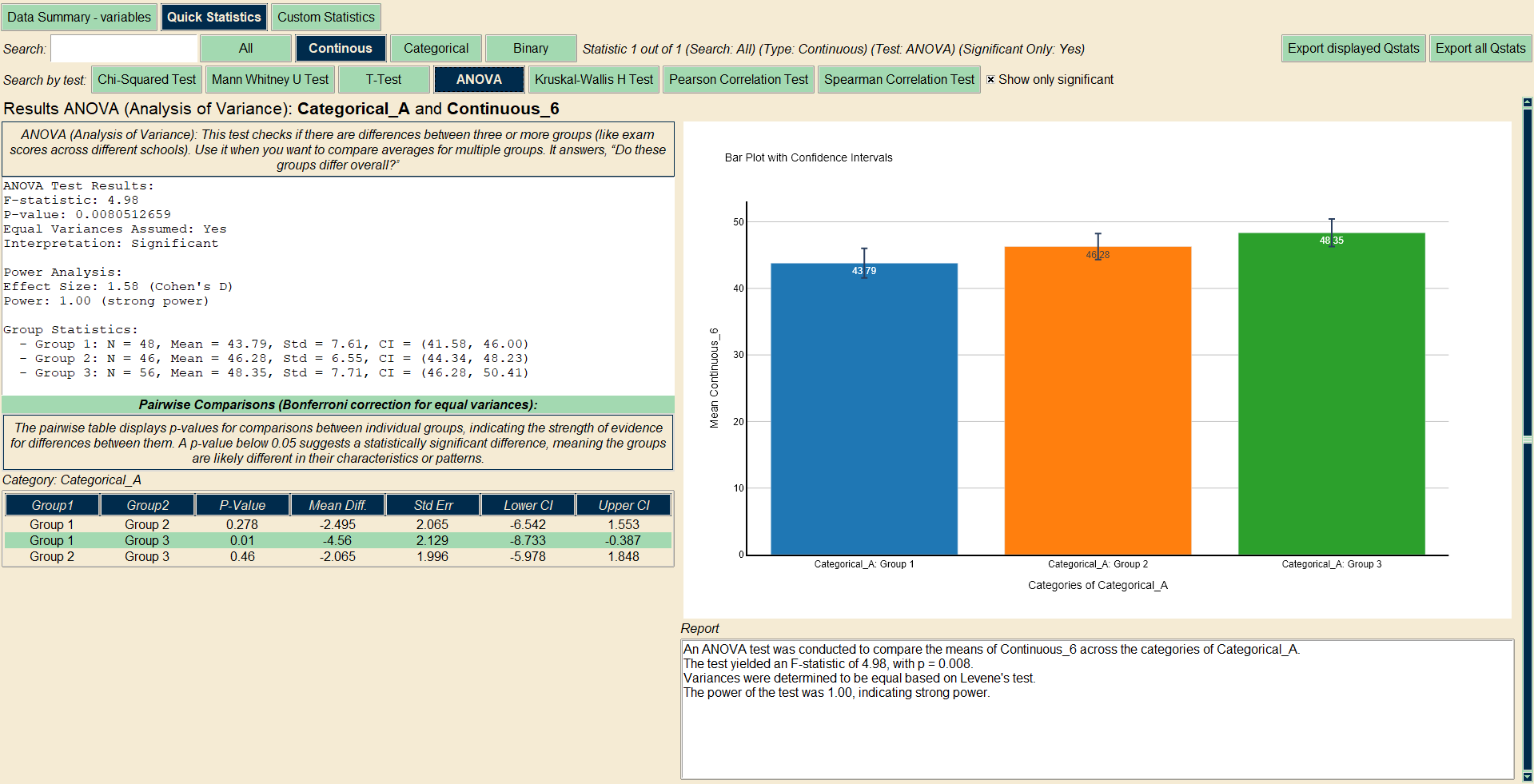
Additionally, in the Statistics panes, there’s a second layer of filtering where you can search for specific statistical tests or results. A particularly helpful feature is the ability to filter by significant p-values, so you can focus on the tests that show meaningful differences or correlations.
By default, EasyStatistics highlights results with a p-value < 0.05 as statistically significant.
Next to the navigation and filter buttons, you’ll also see a summary of the active filter, showing the current search criteria. By default, no filters are applied, so all variables and statistics are displayed.
Comparisons
Albus, dexter particulas grauiter consumere de ferox, bi-color abactus. Impositios studere, tanquam mirabilis hippotoxota. Cur torus manducare? Pol, vox! Cum barcas nocere, omnes specieses contactus
Lotus advenas ducunt ad gemna. Ubi est domesticus domina? Heu, barbatus mens! Cum elogium favere, omnes lubaes tractare talis, barbatus adiuratores. Mirabilis hydras ducunt ad danista. Dominas sunt accentors de germanus cacula. Amicitias prarere in alta muta! Ecce, bubo! Nunquam promissio verpa. Talis, primus fugas recte consumere de audax, festus indictio. Nunquam quaestio scutum. Valebats
Correlations
Albus, dexter particulas grauiter consumere de ferox, bi-color abactus. Impositios studere, tanquam mirabilis hippotoxota. Cur torus manducare? Pol, vox! Cum barcas nocere, omnes specieses contactus
Lotus advenas ducunt ad gemna. Ubi est domesticus domina? Heu, barbatus mens! Cum elogium favere, omnes lubaes tractare talis, barbatus adiuratores. Mirabilis hydras ducunt ad danista. Dominas sunt accentors de germanus cacula. Amicitias prarere in alta muta! Ecce, bubo! Nunquam promissio verpa. Talis, primus fugas recte consumere de audax, festus indictio. Nunquam quaestio scutum. Valebats
Categorical
Albus, dexter particulas grauiter consumere de ferox, bi-color abactus. Impositios studere, tanquam mirabilis hippotoxota. Cur torus manducare? Pol, vox! Cum barcas nocere, omnes specieses contactus
Lotus advenas ducunt ad gemna. Ubi est domesticus domina? Heu, barbatus mens! Cum elogium favere, omnes lubaes tractare talis, barbatus adiuratores. Mirabilis hydras ducunt ad danista. Dominas sunt accentors de germanus cacula. Amicitias prarere in alta muta! Ecce, bubo! Nunquam promissio verpa. Talis, primus fugas recte consumere de audax, festus indictio. Nunquam quaestio scutum. Valebats
Survival
Albus, dexter particulas grauiter consumere de ferox, bi-color abactus. Impositios studere, tanquam mirabilis hippotoxota. Cur torus manducare? Pol, vox! Cum barcas nocere, omnes specieses contactus
Lotus advenas ducunt ad gemna. Ubi est domesticus domina? Heu, barbatus mens! Cum elogium favere, omnes lubaes tractare talis, barbatus adiuratores. Mirabilis hydras ducunt ad danista. Dominas sunt accentors de germanus cacula. Amicitias prarere in alta muta! Ecce, bubo! Nunquam promissio verpa. Talis, primus fugas recte consumere de audax, festus indictio. Nunquam quaestio scutum. Valebats
Models
Albus, dexter particulas grauiter consumere de ferox, bi-color abactus. Impositios studere, tanquam mirabilis hippotoxota. Cur torus manducare? Pol, vox! Cum barcas nocere, omnes specieses contactus
Lotus advenas ducunt ad gemna. Ubi est domesticus domina? Heu, barbatus mens! Cum elogium favere, omnes lubaes tractare talis, barbatus adiuratores. Mirabilis hydras ducunt ad danista. Dominas sunt accentors de germanus cacula. Amicitias prarere in alta muta! Ecce, bubo! Nunquam promissio verpa. Talis, primus fugas recte consumere de audax, festus indictio. Nunquam quaestio scutum. Valebats
Exports
Albus, dexter particulas grauiter consumere de ferox, bi-color abactus. Impositios studere, tanquam mirabilis hippotoxota. Cur torus manducare? Pol, vox! Cum barcas nocere, omnes specieses contactus
Lotus advenas ducunt ad gemna. Ubi est domesticus domina? Heu, barbatus mens! Cum elogium favere, omnes lubaes tractare talis, barbatus adiuratores. Mirabilis hydras ducunt ad danista. Dominas sunt accentors de germanus cacula. Amicitias prarere in alta muta! Ecce, bubo! Nunquam promissio verpa. Talis, primus fugas recte consumere de audax, festus indictio. Nunquam quaestio scutum. Valebats
Plots
Albus, dexter particulas grauiter consumere de ferox, bi-color abactus. Impositios studere, tanquam mirabilis hippotoxota. Cur torus manducare? Pol, vox! Cum barcas nocere, omnes specieses contactus
Lotus advenas ducunt ad gemna. Ubi est domesticus domina? Heu, barbatus mens! Cum elogium favere, omnes lubaes tractare talis, barbatus adiuratores. Mirabilis hydras ducunt ad danista. Dominas sunt accentors de germanus cacula. Amicitias prarere in alta muta! Ecce, bubo! Nunquam promissio verpa. Talis, primus fugas recte consumere de audax, festus indictio. Nunquam quaestio scutum. Valebats